Eye Strain Is Becoming a Screen-Time Problem
For many people, the workday ends only when the phone comes out. Eight hours on a laptop can be followed by several more hours of scrolling, streaming or gaming, and the first complaint is often the same: tired eyes.
Digital eye strain, sometimes called computer vision syndrome, refers to a group of eye and vision symptoms linked with prolonged screen use. It can include tired or sore eyes, dryness, blurred vision, headaches and discomfort around the eyes.
That does not mean screens are permanently damaging everyone's eyes. The more immediate problem is how we use them. A screen held too close, glare from a window, tiny text and hours without a proper break can make ordinary visual work much harder.
What digital eye fatigue actually feels like
The symptoms can be surprisingly broad. Some people notice burning or gritty eyes, while others mainly develop headaches or temporary blurred vision after a long work session.
Common complaints include:
Eye tiredness or aching
Dry, burning or gritty eyes
Temporary blurred vision
Headaches around the forehead or temples
Greater sensitivity to light
Difficulty refocusing after looking away from a screen
Neck and shoulder discomfort from poor posture
Doctar's guide to common eye symptoms and warning signs is useful here because not every eye complaint is caused by screen use.
Persistent blurry vision also deserves a closer look. Dry eyes and blurry vision explains how reduced tear-film quality can temporarily affect clear vision.
Why screens can make your eyes work harder
The eyes naturally blink to spread tears across their surface. When people concentrate on a screen, they often blink less frequently, which can allow the eye surface to dry out.
The problem is also one of sustained focusing. Reading small text at close range for a long period keeps the visual system working continuously instead of allowing it to shift between near and far objects.
Glare makes things worse. Reflections from windows, harsh overhead lights and a screen that is much brighter than the surrounding room can all make reading uncomfortable.
An uncorrected vision problem can add another layer. If your glasses prescription is no longer right, you may compensate by squinting, leaning closer or concentrating harder. Doctar's guide to reading an eye prescription explains common terms such as SPH, CYL and AXIS.
The 20-20-20 rule is simple for a reason
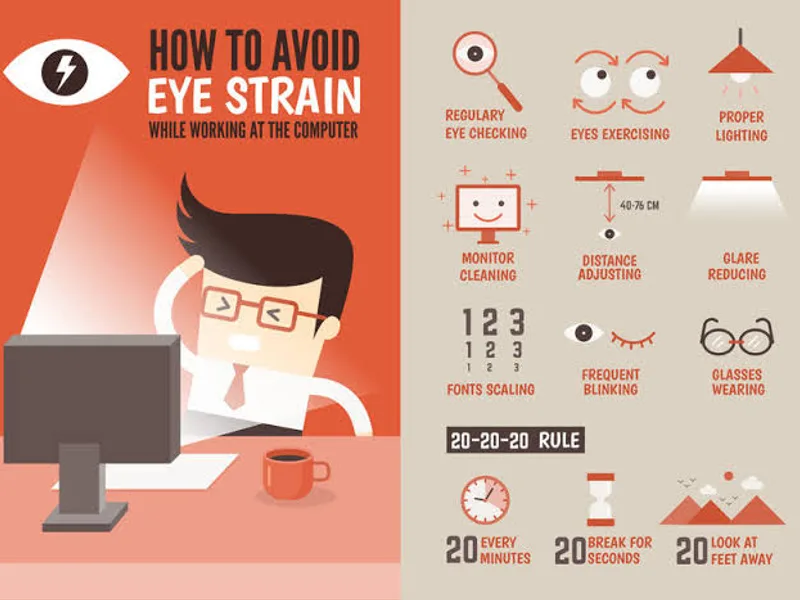
One practical habit is the 20-20-20 rule: after about 20 minutes of screen work, look at something roughly 20 feet away for around 20 seconds.
It is not magic. The point is to interrupt continuous close focusing and give your eyes a short change of task. Doctar's digital eye strain guide recommends this approach alongside better workstation setup and regular breaks.
Longer breaks during the workday are useful too. Standing up, walking around and looking at something across the room is often more realistic than trying to stare at a different screen during a “screen break.”
Your desk setup matters more than you might think
A badly positioned monitor can turn eye strain into a neck-and-shoulder problem as well. Keep the screen at a comfortable distance and position it so you do not have to tilt your head constantly.
The room should not be completely dark while the screen is extremely bright. Adjust screen brightness to suit the surrounding light, and move the monitor if a window or lamp creates distracting reflections.
Text size matters, too. If you regularly lean forward or squint to read, increase the font size rather than forcing your eyes to cope.
Doctar's guide to computer ergonomics and digital eye strain covers monitor position, lighting and posture in more detail.
Don't forget to blink
It sounds almost too basic, but blinking matters.
When concentrating on a spreadsheet, game or video, people can become absorbed and blink less. Deliberately taking complete, regular blinks can help keep the eye surface lubricated.
If dryness keeps returning, an eye-care professional can assess whether dry eye is contributing. Doctar's dry-eye guide discusses environmental factors, medicines and other causes that can sit alongside screen use.
The same principle applies to eye discharge. Persistent discharge, marked redness or swelling is not something to automatically label as digital fatigue. Doctar's information on dry-eye discharge outlines symptoms that warrant medical attention.
What about blue-light glasses?
Blue-light glasses have become a popular answer to screen discomfort, but the evidence does not justify treating them as a universal solution.
Doctar's blue-light glasses explainer notes that digital eye strain has several contributors, including prolonged near work, posture and reduced blinking.
Another Doctar article on blue light and headaches similarly points to the broader pattern of screen exposure rather than blaming blue light alone.
Night-mode settings may make a screen more comfortable for some people, particularly in the evening. But comfort is different from proving that a particular filter prevents eye disease.
When screen strain may not be the real explanation
In clinical practice, this is often missed because “I use a computer all day” sounds like an obvious explanation. It can be, but persistent symptoms deserve a proper assessment rather than a permanent screen-time label.
A change in glasses prescription, dry eye, allergy, migraine or another eye condition can produce overlapping symptoms. Doctar's eye allergy guide describes itching, redness, watering and light sensitivity that may be mistaken for ordinary irritation.
Redness with discharge can also point toward conjunctivitis. For example, adenoviral conjunctivitis is an infection and can spread between people.
Similarly, pain when blinking can have several causes, including dry eye, a stye or conjunctivitis. Doctar's eye-pain-when-blinking guide explains these possibilities.
Warning signs that should not wait
Digital eye fatigue is usually uncomfortable rather than dangerous, but some visual symptoms need urgent assessment.
Sudden vision loss, new flashes, a sudden increase in floaters, a curtain-like shadow, severe eye pain or significant new double vision are not typical “I stared at my laptop too long” symptoms.
Doctar's guide to flashes of light explains why sudden flashes can sometimes be associated with retinal problems. A detached-retina guide also describes the warning pattern of sudden floaters, flashes and a curtain-like area of darkness.
Severe eye pain with redness, headache, nausea or rapidly worsening vision also needs prompt medical attention. Doctar's glaucoma information explains why these symptoms should not be dismissed.
Regular eye checks still have a place
Screen breaks cannot correct every vision problem. A comprehensive eye examination can identify refractive errors and other conditions that may otherwise go unnoticed.
This becomes particularly relevant for people with diabetes. Doctar's background diabetic retinopathy guide notes that early diabetic eye disease may not cause obvious vision symptoms. Its OCT guide for diabetic retinopathy explains how retinal imaging can help clinicians assess retinal changes.
Age also changes the picture. Cataracts can cause blurred vision and glare, while glaucoma may progress without obvious early symptoms. Doctar's early cataract guide and glaucoma information provide more background.
A better approach to screen-heavy days
The most useful changes are not complicated. Increase text size, reduce glare, keep the workstation comfortable, blink deliberately and take regular breaks from close-up viewing.
Don't turn every eye complaint into a blue-light problem. And don't assume every headache after work is an eye problem either. Doctar's screen headache guide discusses the overlap between prolonged screen use, posture, eye fatigue and migraine triggers.
If your glasses recently changed, persistent headaches may also deserve a prescription check. Doctar's guide to headaches from new glasses covers situations where the problem may be related to fit or prescription rather than the screen itself.
One final point: visual disturbances are not always ordinary eye strain. New coloured spots, flashing patterns or unusual vision changes should be assessed according to the symptoms rather than simply blamed on screen time. Doctar's guide to yellow spots in vision offers an example of why new visual symptoms deserve context.