

Emergency & Help
24/7 Emergency & General Advisory
🚨 24/7 Medical Emergency
Non-Emergency Advisory
10:00 AM – 6:00 PM, Mon–Sat
For appointments & general queries.
24/7 Emergency & General Advisory
🚨 24/7 Medical Emergency
Non-Emergency Advisory
10:00 AM – 6:00 PM, Mon–Sat
For appointments & general queries.
Stay updated with our latest healthcare news and your appointments.
Learn about eyestrain headaches: their causes, symptoms, how to find relief with simple tips like the 20-20-20 rule, and effective prevention strategies for your eyes' well-being.

We spend so much time looking at screens these days, whether for work, study, or entertainment. It’s no wonder our eyes can start to feel tired and achy. This discomfort can sometimes lead to a specific type of headache – an eyestrain headache. While not as severe as migraines, these headaches can certainly disrupt your day. Let’s explore what causes them, how you can find relief, and most importantly, how to prevent them from happening in the first place. What Exactly is Eyestrain Headache? Eyestrain, also known as asthenopia, happens when your eyes get tired from intense use. This usually occurs when you focus on a single activity for an extended period, like staring at a computer screen, reading a book for hours, or even driving long distances. When your eyes are strained, the muscles around them can become fatigued, leading to a headache. It’s important to understand that eyestrain itself doesn’t mean your eyes are damaged or injured. The symptoms, including the headache, typically ease up once you give your eyes a good rest. Eyestrain headaches are different from other common headaches like migraines or tension headaches. They generally develop after a period of prolonged visual concentration and tend to get better when you rest your eyes. Unlike some other headaches, they are rarely accompanied by nausea or vomiting. The pain is usually felt behind or around the eyes, and the area might feel tender or weary. Key Characteristics of Eyestrain Headaches: Onset after visual activity: These headaches appear after you’ve been focusing on something for a long time. They won’t typically appear when you first wake up or after a period of rest. Relief with rest: The headache usually subsides once your eyes are rested. Absence of digestive issues: Nausea or vomiting are uncommon with eyestrain headaches. Pain location: The discomfort is typically felt behind or around the eyes, which may feel sore. Think about this common scenario: Ravi works as a software developer and spends 8-10 hours a day in front of his computer. Recently, he’s been experiencing dull headaches by the end of the day, along with dry, itchy eyes. He initially thought it was just stress, but the headaches started happening even on days he felt relaxed, always after a long stretch of coding. This sounds very much like a classic case of eyestrain leading to headaches. Common Culprits Behind Eyestrain Headaches Several factors can contribute to eyestrain headaches. Understanding these causes is the first step towards prevention and relief. 1. Digital Eyestrain (Computer Vision Syndrome) This is perhaps the most common culprit in today’s digital age. When we stare at screens – computers, smartphones, tablets – for prolonged periods, our eyes work harder. We also tend to blink less frequently, which can lead to dry, irritated eyes, further exacerbating the strain. Several factors related to screen use can worsen digital eyestrain: Screen glare and reflections: Bright lights reflecting off your screen force your eyes to work harder to see clearly. Poor contrast: Text that is difficult to read against the background can strain your eyes. Incorrect screen distance: Sitting too close or too far from your screen can cause discomfort. Poor posture: Looking up or down at your screen for too long can strain your neck and eye muscles. 2. Uncorrected or Incorrect Vision If you have vision problems like nearsightedness (myopia), farsightedness (hyperopia), or astigmatism that haven’t been corrected, or if your current glasses or contact lens prescription is outdated, your eyes have to work overtime to focus. This constant effort can lead to fatigue and headaches. Your eyes are constantly trying to compensate for the blurriness, which tires them out significantly. 3. Poor Lighting Conditions Trying to see clearly in lighting that is either too bright or too dim forces your eyes to adjust excessively. In dim light, your pupils dilate, and in bright light, they constrict. This constant adjustment can be tiring. Squinting in an attempt to see better in poor light also strains the muscles around your eyes and face. 4. Prolonged Focus on Close-Up Tasks It’s not just screens! Any activity that requires sustained close-up focus can lead to eyestrain. This includes: Reading for extended periods Sewing or knitting Drawing or detailed craftwork Driving long distances When you focus on something up close, the ciliary muscles inside your eyes contract to make the lens thicker and more powerful, allowing you to see the near object clearly. Holding this contraction for a long time can lead to muscle fatigue and pain. 5. Dry Eyes As mentioned earlier, reduced blinking during screen time or in dry environments can lead to dry eyes. Dryness itself can cause irritation and discomfort, which can contribute to or worsen eyestrain headaches. When your eyes feel dry and gritty, it’s harder to keep them comfortable and focused. Recognizing the Symptoms Besides the headache itself, eyestrain can manifest in several ways. Being aware of these symptoms can help you identify the problem early: Aching or tired eyes Burning or itching sensation Dry eyes Watery eyes Blurred or double vision Increased sensitivity to light (photophobia) Difficulty concentrating Soreness or pain around the eyes Headache, typically felt behind or around the eyes Finding Relief: What You Can Do Now If you’re experiencing an eyestrain headache, the good news is that relief is often within reach. The primary goal is to give your eyes a break and reduce the strain. 1. Give Your Eyes a Break – The 20-20-20 Rule This is a simple yet highly effective strategy for anyone spending time on digital devices. Every 20 minutes , look at something at least 20 feet away for 20 seconds . This allows the focusing muscles in your eyes to relax. Set a timer if you need a reminder! 2. Adjust Your Screen Settings Optimizing your screen can make a significant difference: Screen Distance: Position your computer screen at arm’s length, about 25 inches (63 cm) away from your eyes. Eye Level: The top of the screen should be at or slightly below eye level. This prevents you from tilting your head up, which can strain your neck and eye muscles. Brightness: Adjust your screen brightness to match the surrounding light. It shouldn’t look like a light source in a dark room, nor should it be so dim that you strain to see. Text Size and Contrast: Increase the text size if needed, and ensure good contrast between the text and background (e.g., black text on a white background). Reduce Glare: Use an anti-glare screen filter or position your screen to avoid reflections from windows or overhead lights. 3. Optimize Your Workspace Lighting Ensure your workspace is well-lit, but avoid harsh glare. Position lamps so they don’t shine directly on your screen or into your eyes. Natural light is great, but if it causes glare, use blinds or curtains. 4. Use Artificial Tears If dry eyes are contributing to your discomfort, over-the-counter lubricating eye drops (artificial tears) can provide relief. Use them as needed throughout the day. 5. Gentle Eye Exercises and Palming While resting your eyes, you can try a technique called 'palming'. Rub your hands together to warm them, then gently cup them over your closed eyes without pressing on them. This helps to relax the eyes in soothing darkness. You can also try gently closing your eyes and rolling them in a circular motion a few times, then blinking. 6. Stay Hydrated Dehydration can worsen dry eyes and overall fatigue. Make sure you’re drinking enough water throughout the day. Preventing Eyestrain Headaches: Long-Term Strategies Prevention is always better than cure. By incorporating these habits into your routine, you can significantly reduce your chances of developing eyestrain headaches. 1. Take Regular Breaks Beyond the 20-20-20 rule, consciously take short breaks every hour to stand up, stretch, and look away from your screen. This helps to reset your visual focus and reduce muscle fatigue. 2. Get Regular Eye Check-ups Visit your eye doctor (optometrist or ophthalmologist) regularly, at least once a year. Ensure your vision prescription is up-to-date. Even minor vision changes can contribute to eyestrain. 3. Blink More Often! Make a conscious effort to blink fully and frequently, especially when using digital devices. This keeps your eyes lubricated. 4. Invest in Blue Light Glasses (Optional) While the evidence is still debated, some people find relief from blue light filtering glasses, especially if they use screens late at night. These glasses can reduce the amount of blue light emitted from screens, which may help with sleep and potentially reduce eye strain for some individuals. 5. Consider Ergonomics Ensure your entire workstation is set up ergonomically. This includes your chair height, desk setup, and monitor position, all of which can indirectly affect how you hold your head and eyes, contributing to strain. When to Consult a Doctor While eyestrain headaches are usually harmless and resolve with rest, there are times when you should seek professional medical advice. If your headaches are severe, persistent, or worsening. If the headache is accompanied
In summary, timely diagnosis, evidence-based treatment, and prevention-focused care improve long-term health outcomes.
Visit Hospital
Near You

For years, long COVID had no proven treatment — only symptom management. That changed in July 2026, when UCL researchers published trial results showing a structured cognitive rehabilitation program produced lasting improvement in long COVID brain fog. This piece explains what the trial found, how i
July 23, 2026
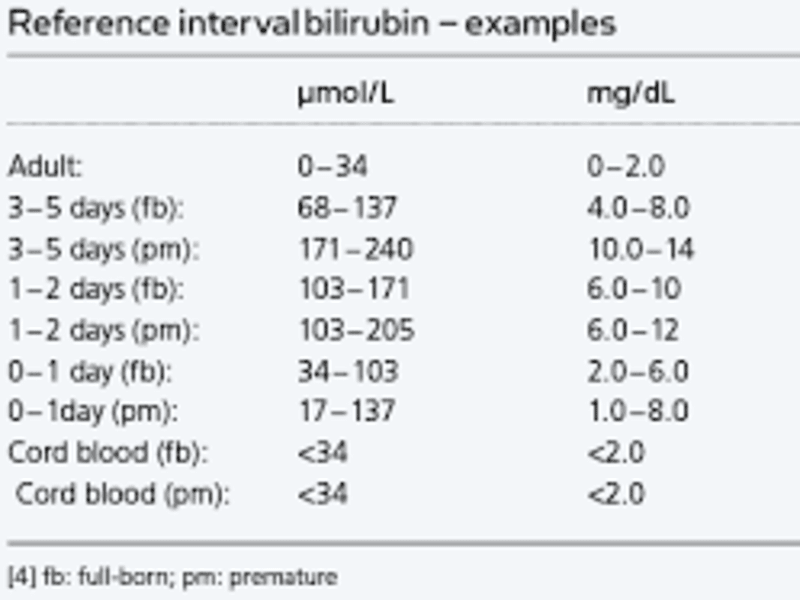
Bilirubin levels help assess liver health. This guide explains normal bilirubin values, types, causes of abnormal levels, symptoms, and when to seek medical advice.
April 11, 2026

Learn how to properly clean and care for your new ear piercing to ensure it heals beautifully and avoid infection. Follow our step-by-step guide for optimal results.
April 1, 2026